

Where to Find Course Evaluations

Students and instructors access Course Evaluations in different ways within Canvas. Use the sections below to find the correct access point based on your role.
Student Access (with Canvas)
Students can access course evaluations directly in Canvas:
- Log in to Canvas at https://montana.instructure.com using your NetID and password.
- Click Help in the Global Navigation menu (left-hand side).
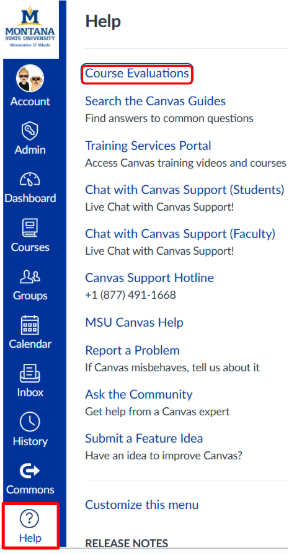
3. Select Course Evaluations from the menu.
This will take you to the evaluation platform, where you can complete any available evaluations.
Note: Students may be prompted to sign in again.
Instructor Access (external link)
Instructor course evaluations are managed outside of Canvas by the Center for Faculty Excellence.
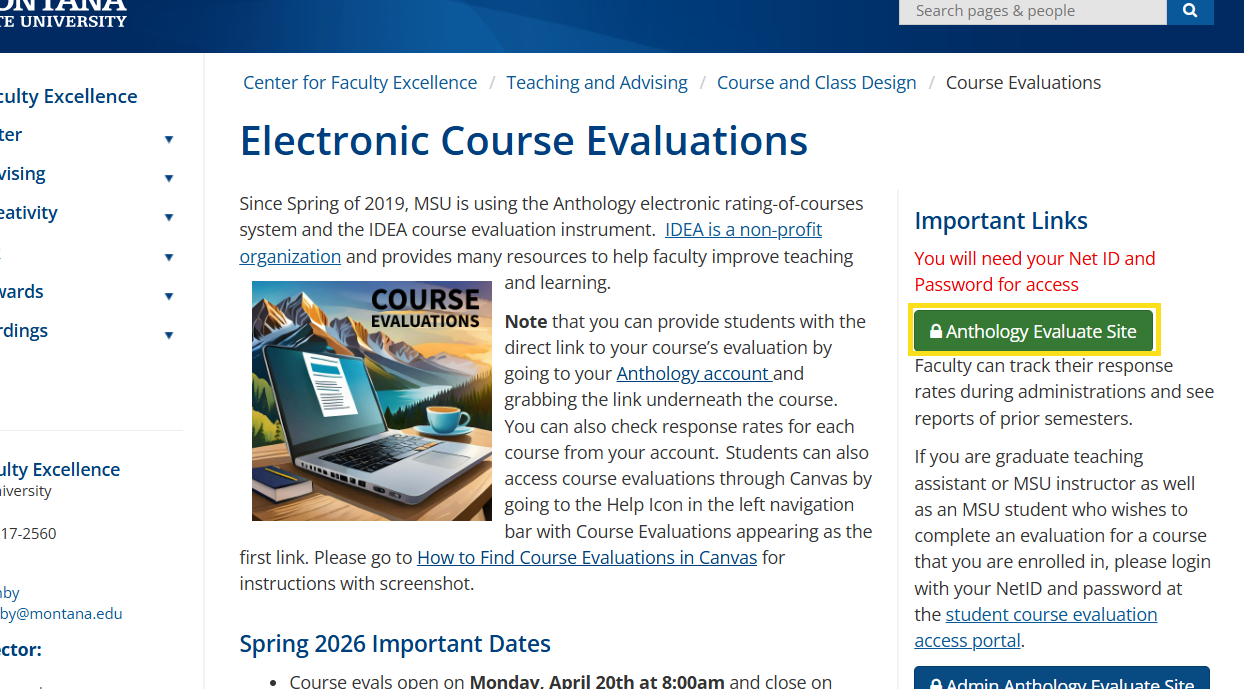
- Visit the Center for Faculty Excellence course evaluation page.
- This page also provides additional information and support contacts for course evaluations.
- Click the green “Anthology Evaluation Site” button to access the instructor portal.
Important Notes:
- Course evaluations are only available during the designated evaluation period.
- If you do not see evaluations, the window may not be open or may have already closed.
- If you are both an instructor and a student, use the student course evaluation portal (not the instructor site) to complete your course evaluations.